
Quick Summary
Effective LiftMaster gate motor troubleshooting requires systematically isolating electrical supply failures, diagnostic board codes, and sensor misalignments from physical hardware binding. Ironworks Gate Co. recommends verifying manual gate clearance and cleaning optical photo-eyes before modifying force settings or replacing internal electronic components. Property owners will learn how to identify common operational faults and know when to call Ironworks Gate Co. for same-day troubleshooting or a free on-site diagnostic assessment on complex motor issues.
Liftmaster Gate Motor Troubleshooting: Preliminary Checks
Disclaimer: This article offers preliminary checks, not guaranteed fast fixes. Model-specific manuals control all installation, troubleshooting, and safety procedures.
When a gate operator stops working, troubleshooting depends on the specific LiftMaster model. Possible causes include obstruction detection, photoelectric or contact-sensor inputs, mechanical binding, battery or power problems, wiring faults, limit settings, and control-board conditions. In automated vehicular gate systems, physical resistance along the gate line, track debris, hinge binding, or an interrupted safety circuit can trigger safety stops.[3]
As noted by Ironworks Gate Co., before replacing electronic components, a systematic check of your power supply, safety devices, diagnostic readout, and physical gate balance can help identify the cause of the issue.
Liftmaster Gate Motor Troubleshooting: Diagnostic Overview
Quick Diagnostic Routine: Check your incoming power and battery backup per the manual. Next, inspect photo-eye sensors for cleanliness and alignment. If the motor hums but fails to move the gate, disengage the manual release and test gate movement by hand to check for mechanical binding. Adjust limit switches and force settings only after confirming the gate moves freely manually, following the model-specific manual.
A systematic diagnosis isolates mechanical strain from electrical faults before settings are changed or parts are replaced.
Primary Diagnostic Categories
- Power Supply and Battery Reserves: Confirm steady incoming power, check dedicated breakers, and verify battery condition according to the manual.
- Monitored Safety Devices: Clean and realign optical photo-eyes and inspect contact or edge sensors.
- Control Board Fault Readouts: Check the diagnostic indicators or digital display on the control board against your specific model manual.
- Mechanical Hardware and Alignment: Disengage the drive mechanism to verify whether the gate moves smoothly or binds on hinges, rollers, or posts.
Environmental Stress and Gate Operation
Environmental conditions can place mechanical stress on gate systems. Temperature changes and wind resistance can increase friction on gate panels and hardware. When an operator encounters excessive resistance, safety systems or force settings may stop or reverse gate travel depending on the model’s design.[4]
What You Need Before Starting Diagnostics
Before inspecting your gate system, clear the driveway of any vehicles, keep children and pets away, and assemble basic service tools:[1]
- Control box key and standard screwdriver set
- Clean microfiber towel for optical lenses
- Your model-specific operator manual
Safety Standards and Precautions
Warning: Do not measure line voltage or open energized equipment unless qualified. Refer all high-voltage electrical work to a licensed or qualified technician. Never bypass or disconnect safety devices. A documented obstruction test is required after servicing or adjustments.
Applicable gate operators use safety mechanisms such as inherent obstruction detection, photoelectric sensors, contact sensors, or pressure-relief devices under relevant requirements. Provide a separate pedestrian gate where pedestrian access is likely, consistent with applicable requirements and the installation manual.[2]
Step 1: Check Power Connections, Breakers, and Battery Health
If your LiftMaster gate operator shows no signs of power, begin by checking the power supply.
Power Supply Checks
- Check the dedicated sub-panel breaker, GFCI outlet, and any external disconnect switches.
- Inspect for tripped breakers or fuses according to the manual.
- Do not measure line voltage or open energized equipment unless qualified; contact a licensed electrician for line-voltage diagnostics.
Battery Backup Systems
Battery type, voltage, and testing procedures vary by model and must be verified in the official manual. If the board powers on but the operator cannot move the gate under battery power, depleted or failing batteries may be a factor, depending on the system configuration.
Step 2: Inspect and Clean Photo-Eye Safety Sensors
Applicable gate operators use safety mechanisms such as inherent obstruction detection, photoelectric sensors, contact sensors, or pressure-relief devices under relevant requirements. If a gate stops or fails to close, safety sensor inputs or optical alignment issues may be involved.
- Wipe the Lenses: Clear dust, spiderwebs, water spots, and debris off sensor units using a clean microfiber cloth.
- Check Optical Alignment: Verify sensor alignment indicators according to the model manual to ensure clear line-of-sight alignment.
- Address Sunlight Glare: Direct sunlight into a receiving lens can interfere with optical sensors; fit protective hoods or adjust positioning as permitted in the manual.
- Inspect Low-Voltage Wiring: Check sensor wiring runs for physical damage or pinched wires.
Step 3: Read Diagnostic Codes on the Board
Need liftmaster gate motor troubleshooting?
We’re available now - call for a fast, free estimate.
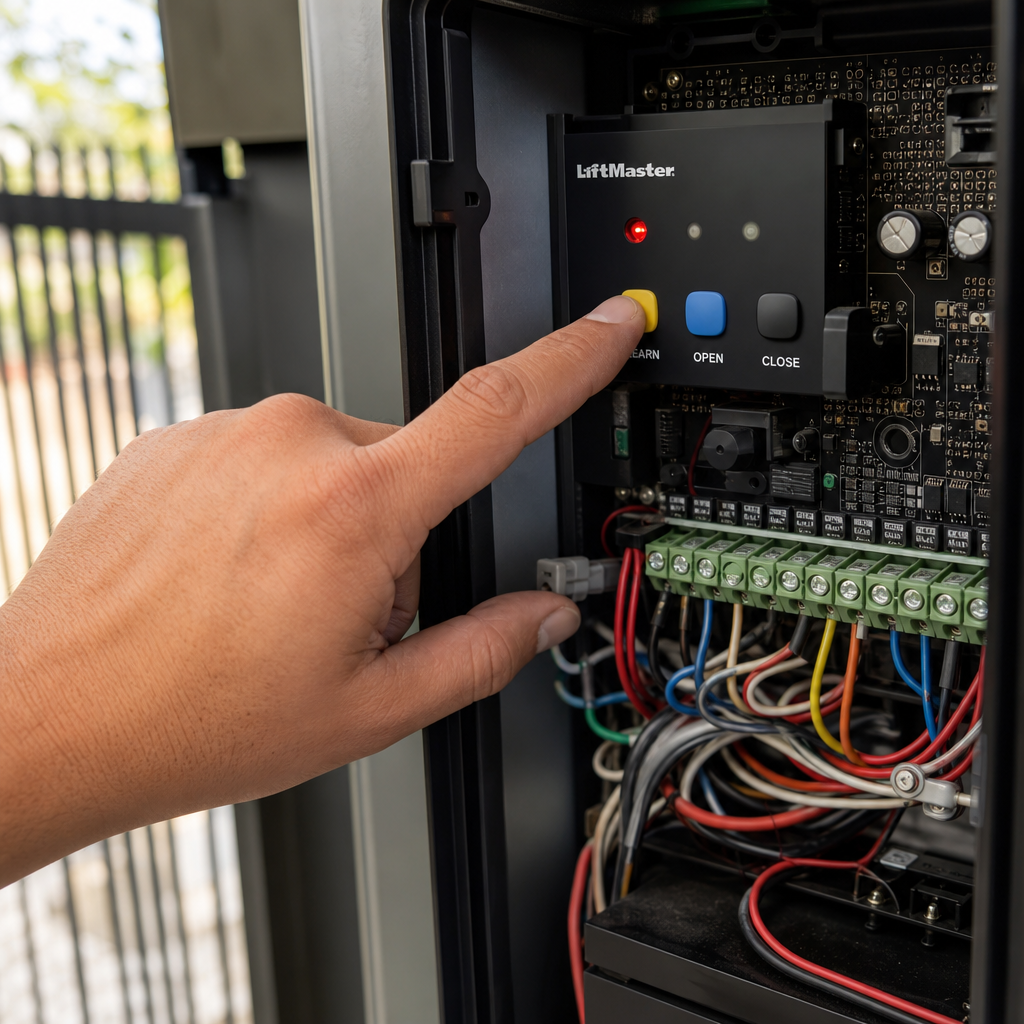
LiftMaster control boards feature diagnostic indicators that display fault information when an interruption occurs.
How to Check Diagnostic Codes
- Access the control board as outlined in your operator manual.
- Locate the diagnostic display or LED indicators.
- Observe and record any active diagnostic flash codes or displays before resetting the unit.
- Consult the diagnostic chart in the specific model manual to interpret the fault codes.
Step 4: Check for Mechanical Resistance, Sag, and Drag
When a motor hums, strains, or starts to move and then reverses, mechanical friction or binding along the gate line may be a factor.
Testing with the Manual Release
- Turn off power to the operator for safety.
- Disengage the mechanical release according to the model manual.
- Push and pull the gate by hand through its entire travel path from fully open to fully closed.
The gate should operate smoothly throughout its travel. According to technicians at Ironworks Gate Co., high physical resistance indicates mechanical issues that must be addressed.
Common Mechanical Issues
- Hinge Post Deflection: Posts that have shifted or settled can cause the gate to drag against the ground.
- Debris in Tracks: Dirt, gravel, and debris inside sliding gate tracks impede roller movement.
- Worn Bearings: Guide rollers or wheels that are worn or unlubricated create excessive drag.
- Chain Tension: On slide operators, improper chain tension can lead to binding.
Step 5: Review Travel Limits and Reversal Sensitivity
If mechanical hardware moves freely by hand and safety devices are clear, travel limits or force sensitivity settings may need recalibration.
Checking Travel Limits
Consult your specific operator manual for the limit setting procedure. Set the open and close limits so the gate stops at the intended positions without impacting hard stops.
Understanding Force and Obstruction Sensitivity
Inherent obstruction systems monitor mechanical load. Never increase force settings to compensate for a binding gate. Correct mechanical issues first, and set force levels in accordance with the manufacturer’s manual. Test gate operators monthly and retest after force or travel-limit adjustments, following the applicable manual and safety procedure.
When to Call a Professional Gate Technician
As Ironworks Gate Co. points out, while clearing sensors and inspecting hardware are standard maintenance tasks, complex issues require professional service:
- High-Voltage Electrical Work: Main line connections, transformer replacements, and severe surge damage.
- Structural Welding and Post Repair: Re-plumbing structural posts, welding hinges, or rebuilding track assemblies.
- Internal Gearbox or Actuator Repair: Servicing internal drive mechanisms, hydraulic units, or mechanical actuators.
- Loop Detector Diagnostics: Troubleshooting underground inductive loops and access wiring.
Frequently Asked Questions About Gate Motor Troubleshooting
Why is my LiftMaster gate motor humming but not moving the gate?
A humming motor without movement may indicate mechanical binding, a capacitor issue on AC models, insufficient battery voltage on DC models, or drive component issues, depending on the model. Disengage the manual release and verify that the gate moves freely by hand before testing electrical parts.
How do I reset my LiftMaster gate motor?
Follow the exact model manual’s reset procedure. Some models may require a control-board reset or power cycle after correcting a fault.
Why does my gate reverse direction before finishing its cycle?
When a gate reverses mid-cycle, it may be responding to an obstruction input, such as an interrupted photoelectric beam, a contact sensor activation, or mechanical resistance along the gate path.
How often should gate safety devices and force settings be tested?
Test gate operators monthly and retest after force or travel-limit adjustments, following the applicable manual and safety procedure.
Need liftmaster gate motor troubleshooting?
We’re available now - call for a fast, free estimate.
Sources
- New Safety Standard for Automatic Security Gates Helps … – cpsc.gov (2000)
- New safety standards for automatic security gates – homeinspector.org (2001)
- Gate Operators – UL Solutions Code Authorities – code-authorities.ul.com (2011)
- UL Compliant Access Systems – liftmaster.com (2018)
Related reading: Medea Valley Equestrian Gate Repair – Call Now-10% Off – On-Site in 60 Minutes – Free Estimate
Related reading: Santa Ana Winds Gate Damage Repair | Call Now-10% Off | On-Site in 60 Minutes | Free Estimate
Related reading: Bft Gate Access Control Installation – Call Now-10% Off – Same-Day Service – Free Estimate
Frequently Asked Questions
What do the blinking diagnostic LEDs on a LiftMaster control board mean?
Blinking diagnostic LEDs indicate specific system states or component faults, such as low battery reserves, safety sensor misalignments, or travel limit errors. Recording the flash sequence against your specific model manual helps isolate the problem, though persistent board faults warrant an on-site diagnostic assessment by Ironworks Gate Co.
Why does my LiftMaster gate open by itself or refuse to stay closed?
Ghost opening or failure to remain closed typically stems from shorted underground loop detectors, misaligned safety photo-eyes, or stuck access control relays. If clearing sensor lenses and power-cycling the board does not correct the cycle, Ironworks Gate Co. provides same-day troubleshooting to test wiring circuits.
Can weather conditions cause false obstruction stops on LiftMaster gate motors?
Yes, high winds increase lateral resistance and cold temperatures can stiffen hardware grease, triggering the motor inherent force sensitivity to reverse travel. Instead of unsafely increasing the force limits on a binding gate, inspect the mechanical hinges or call Ironworks Gate Co. for mechanical alignment and limit recalibration.
About the author
 |
Sarah Jenkins Sarah Jenkins is a technical writer specializing in property security and automated access systems. She holds a B.S. in Mechanical Engineering from California State University, Northridge, and has over seven years of experience documenting maintenance protocols for gate and garage door technicians. Her writing focuses on providing clear, practical advice for homeowners and property managers navigating gate repair and cost management. |
Gate not opening, off track, or opener dead?
We’re available now - call for a fast, free estimate.
Call Now - Free Estimate